Abditex Bullion
User guide
Everything Abditex Bullion does, in plain language. Start with the quick start below, or jump to the topic you need.
Screenshots are from the iPhone app. The Android app has the same features, drawn in Android's own style.
What Abditex Bullion is
A private record of the physical bullion you own, valued at current spot prices. Your inventory is stored on your device, encrypted. It is never uploaded, and we cannot read it — not because we promise not to, but because we never hold the keys.
It is not a coin-collector or grading app, not a trading platform, not a marketplace, and not a social product. There is no account, no login, and no email address to give us.
Quick start
- Install and open the app. The first screen explains what does and does not leave your device. There is nothing to sign up for.
- Create an Abditum. An Abditum is a container for holdings — one for each place you keep things ("Safe", "Bank box", "Dad's estate"). Plural: Abdita.
- Add a holding. Metal, kind (coin, bar, round, junk silver, other), how many, and weight. Everything else is optional.
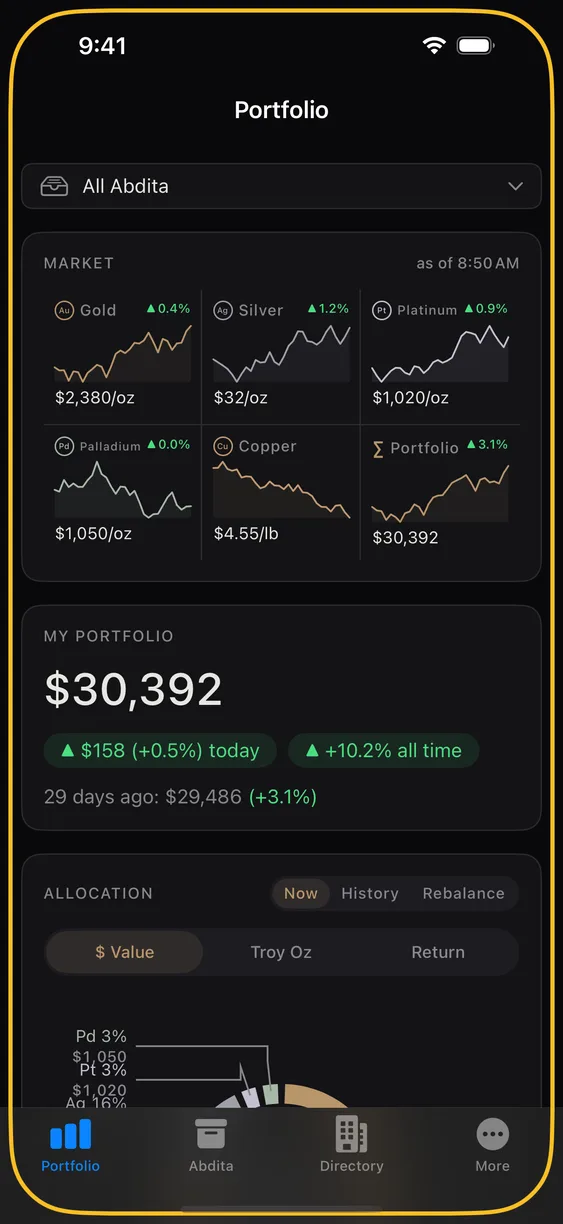
- Look at the Portfolio tab. Your holdings are now valued at current spot, with daily and all-time movement.
- Make a backup. More ▸ Backup. Choose a passphrase, save the file somewhere you control.
The one thing to do today
Back up. Personal inventory is never transmitted anywhere, which is the point — but it also means there is no copy on our server to restore from. If you lose the phone and have no backup file, the inventory is gone. A backup takes about thirty seconds: More ▸ Backup.
The guide
Inventory
Holdings, Abdita, tags, photos, search, and CSV export.
Portfolio
The market ticker, your total value, the allocation ring, and the What If slider.
Prices & alerts
Where spot prices come from, how charts work, and how to be told when a price moves.
Sharing
Sharing an Abditum with a spouse, partner, or heir — and the code you read aloud.
Backup & estate
Encrypted backups, restoring on a new phone, and leaving an inventory to your heirs.
Dealers
The directory, buying online or locally, and how searching stays private.
Privacy & security
App lock, demo mode, deleting your data, and what actually crosses the network.
Subscription
Free vs Pro, the trial, Family Sharing, restoring purchases, and cancelling.
Getting help
Email support@abditex.com. If you have Abditex Pro we aim to reply within 48 hours; without it, we reply as we can. We will never ask you for your inventory, a passphrase, or a screenshot of your holdings.
If the app misbehaves, the in-app error report is more useful than a description — it shows you exactly what will be sent before anything is sent, and you can cancel.
Found a security vulnerability? Do not email support. See the security page for the disclosure process and our PGP key.